
程序设计基础大作业 反汇编语言
本文档是程序设计基础(II),即MIPS汇编语言大作业的实验报告。
实验要求
使用MIPS汇编语言编写程序,并使用MARS运行,尽量多地使用宏和函数调用以使主函数的结构清晰明了。
要求对于输入的最多不超过100个MIPS汇编机器码进行反汇编操作,如果输入的过程中出现位数不正确或不符合十六进制格式的数则跳过,直到输入了正确的MIPS汇编机器码为止。完成输入之后,输出一句话表达一共成功输入了多少条MIPS汇编机器码。随后对输入的汇编机器码进行反汇编,每一行的格式为:
[指令地址] 原指令(16进制) 标签: 指令
由于本学期所学的MIPS汇编语言仅涉及整数的处理,本次实验给出的MIPS指令表并非完整的MIPS汇编指令表,而是缺少一部分的表,对于表中没有出现的指令,程序运行过程中不作处理,在输出时以???表示这是一个未知指令。
下面是针对输入输出格式说明给出的样例:
Input MIPS machine code:3C011001 34240000 24080006 20850004 00084821 8C8A0000 8cab0000 016a082a 10200002 acaa0000 ac8b0000 20a50004 2129ffff 0009082a 1420fff6 20840004 2108ffff 0008082A 1420FFF0
19 instructions loaded
[00400000] 3c011001       lui $at,4097
...
[0040000c] 20850004 L001: addi $a1,$a0,4
[00400010] 00084821       addu $t1,$zero,$t0
[00400014] 8c8a0000 L002: lw $t2,0($a0)
...
[00400034] 0009082a       slt $at,$zero,$t1
[00400038] 1420fff6       bne $at,$zero,L002[00400014]
...
[00400048] 1420fff0       bne $at,$zero,L001[0040000c]
代码思路
数据段 (Data Segment)
在解决实际问题之前,我需要先考虑的问题是如何通过在数据段中预先存好数据以减少实际代码过程中的冗杂判断。
指令名称
我对指令和寄存器名的的字符串进行了一些预先处理,将所有指令拼接到一起,每个指令之间以\0符号隔开以方便直接输出字符串,为了方便地查找需要输出的字符串的起始位置,我对每一条指令的字符串相比所有字符串的偏移量做成了一个一一对应的数组。
放在了数据段中:
Op_Code_Low:	.asciiz	"j\0jal\0beq\0bne\0blez\0bgtz\0addi"
		.asciiz "addiu\0slti\0sltiu\0andi\0ori\0xori\0lui"
# Other Items
Op_Offset_Low:	.byte	-1, -2, 0, 2, 6, 10, 14, 19, 24, 29, 35
		.byte	40, 46, 51, 55, 60
那么,在遇到实际的寄存器和指令时,我就可以用类似如下的思路来输出(用C语言的方式表达)。
char *	str_Start	= Type_Code + Type_Offset[Offset_Value];
printf("%s", str_Start);
指令格式
除了对于指令和寄存器的输出外,我还需要考虑的内容是指令的格式。显然我不能在最后的输出函数中对每一个指令都用branch语句来控制它的输出格式,所以我在对指令表进行观察和总结之后对指令的格式作出了如下的定义:
| Format Type | Format |
|---|---|
| 0 | 非法格式(指令不存在) |
| 1 | [Label] Imm |
| 2 | [Label] rs, Imm |
| 3 | [Label] rs, rt, Imm |
| 4 | rt, Imm |
| 5 | rt, Imm(rs) |
| 6 | rt, rs, Imm |
| 7 | rs |
| 8 | rd, rs |
| 9 | rd, rt, sa |
| 10 | rd, rt, rs |
| 11 | rd, rs, rt |
| 12 | rd |
| 13 | rs, rt |
| 14 | (None) |
那么,我就可以根据给定指令表中的指令格式为每一个Op_Code、Function_Code指定其对应的输出格式类别,对于输出格式的控制,则可以参考前文中的输出思路。
Format_Ctrl:	.ascii	"3g.3g4g.4gi.4gir.4g3gi.3.5g3.5g4gs.5g4g3."
		.ascii	"5g3g4.5.3g4."
# Other Items
Format_Offset:	.byte	0, 0, 0, 3, 8, 12, 17, 23, 25, 29, 35
		.byte	41, 47, 49
其中.代表格式分隔符,当输出格式符检查到.时说明这个格式的输出结束,对于其他符号:
-
g表示Gap,也就是输出,; i表示Imm,表示此处需要输出立即数;s表示Sa,表示此处应该输出的是Shift Amount寄存器存储的值,而非该值大小所对应的寄存器名- 数字作为从数据段
Is_Label到Command_Rs、Command_Rt、Command_Rd之间的偏移量的百分之一。
标签因需要进行特殊处理,在后续代码编写的过程中,考虑到传参的问题,我并没有在输出格式控制中对其进行处理,而是通过格式的编号进行判断,当目前处理的格式编号不大于3时,那在处理完正常的格式输出之后,我需要输出其跳转向的标签。例如:
3代表我需要查找的寄存器编号存储在当前所检查的Is_Label向后偏移300的内存地址,即对应的Command_Rs的地址。那么相应的,
4代表的就是Command_Rt,5代表的就是Command_Rd,用这种方式来控制输出的指令的格式。
指令数据存储
对于每一条指令,根据其为R指令、I指令或J指令进行分解,并将分解到的数据存储在按如下方式分配的数据段中:
# Other Items
		.align	2
Is_Label:	.space	100
Command_Type:	.space	100
Command_Op:	.space	100
Command_Rs:	.space	100
Command_Rt:	.space	100
Command_Rd:	.space	100
Command_Sa:	.space	100
Command_Func:	.space	100
Command_Imm:	.space	400
Command_Array:	.space	400
这样的数据存储方式能允许我通过地址偏移的方式直接得到当前正在处理的指令的除立即数外的所有数据,所以在输出时我只需要传入Is_Label和Command_Imm就可以得到我所有需要使用的数据,从而简化最后的输出代码。
符号类
输出指令时需要有方括号、小括号、冒号、空格、逗号等符号,这些内容包括输入缓冲区、输出时的十六进制数缓冲区、输出的标签前缀缓冲区一起存储于数据段中,下面只给出部分作为示例。
# Other Items
Unknown:	.asciiz "???"
Colon:		.asciiz ":"
Gap:		.asciiz	" "
NLine:		.asciiz	"\n"
完整数据段代码
下面给出我的完整数据段代码,在上传的代码文件中,我在数据段之前通过代码中文档的方式说明了数据段中各分配内存的用途。
.data
Op_Code_Low:	.asciiz	"j\0jal\0beq\0bne\0blez\0bgtz\0addi"
		.asciiz "addiu\0slti\0sltiu\0andi\0ori\0xori\0lui"
Op_Code_High:	.asciiz	"lb\0lh\0lwl\0lw\0lbu\0lhu\0lwr\0sb\0sh"
		.asciiz	"swl\0sw\0swr"
Op_Special:	.asciiz	"bgez\0bgezal\0bltz\0bltzal"
Function_Code:	.asciiz	"sll\0srl\0sra\0sllv\0srlv\0srav\0jr"
		.asciiz	"jalr\0syscall\0mfhi\0mthi\0mflo\0mtlo"
		.asciiz	"mult\0multu\0div\0divu\0add\0addu\0sub"
		.asciiz	"subu\0and\0or\0xor\0nor\0slt\0sltu"
Register_Name:	.asciiz	"$zero\0$at\0$v0\0$v1\0$a0\0$a1\0$a2\0$a3"
		.asciiz	"$t0\0$t1\0$t2\0$t3\0$t4\0$t5\0$t6\0$t7"
		.asciiz	"$s0\0$s1\0$s2\0$s3\0$s4\0$s5\0$s6\0$s7"
		.asciiz	"$t8\0$t9\0$k0\0$k1\0$gp\0$sp\0$fp\0$ra"
Format_Ctrl:	.ascii	"3g.3g4g.4gi.4gir.4g3gi.3.5g3.5g4gs.5g4g3."
		.ascii	"5g3g4.5.3g4."
Input_Prompt:	.asciiz	"Input MIPS machine code:"
Loaded_Notice:	.asciiz	" instructions loaded\n"
Label_Out:	.ascii	"L"
		.space	2
		.byte	0
Hex:		.space	8
		.byte	0
Buffer:		.space	1001
LSBracket:	.asciiz	"["
RSBracket:	.asciiz	"]"
Comma:		.asciiz ","
LBracket:	.asciiz "("
RBracket:	.asciiz ")"
Unknown:	.asciiz "???"
Colon:		.asciiz ":"
Gap:		.asciiz	" "
NLine:		.asciiz	"\n"
Op_Offset_Low:	.byte	-1, -2, 0, 2, 6, 10, 14, 19, 24, 29, 35
		.byte	40, 46, 51, 55, 60
Op_Offset_High:	.byte	0, 3, 6, 10, 13, 17, 21, -3, 25, 28, 31
		.byte	35, -3, -3, 38
Op_Offset_Special:
		.byte	0, 5, 12, 17
Format_Offset:	.byte	0, 0, 0, 3, 8, 12, 17, 23, 25, 29, 35
		.byte	41, 47, 49
Function_Offset:
		.byte	0, -3, 4, 8, 12, -3, 17, 22, 27, 30, -3
		.byte	-3, 35, -3, -3, -3, 43, 48, 53, 58, -3
		.byte	-3, -3, -3, 63, 68, 74, 78, -3, -3, -3
		.byte	-3, 83, 87, 92, 96, 101, 105, 108, 112
		.byte	-3, -3, 116, 120
Register_Offset:
		.byte	0, 6, 10, 14, 18, 22, 26, 30, 34, 38, 42
		.byte	46, 50, 54, 58, 62, 66, 70, 74, 78, 82
		.byte	86, 90, 94, 98, 102, 106, 110, 114, 118
		.byte	122, 126
Op_Format_Low:	.byte	0, 2, 1, 1, 3, 3, 2, 2, 6, 6, 6, 6
		.byte	6, 6, 6, 4
		.space	16
Op_Format_High:	.byte	5, 5, 5, 5, 5, 5, 5, 0, 5, 5, 5, 5
		.byte	0, 0, 5
		.space	17
Func_Format:	.byte	9, 0, 9, 9, 10, 0, 10, 10, 7, 8, 0, 0, 14
		.byte	0, 0, 0, 12, 7, 12, 7, 0, 0, 0, 0, 13, 13
		.byte	13, 13, 0, 0, 0, 0, 11, 11, 11, 11, 11, 11
		.byte	11, 11, 0, 0, 11, 11
		.space	20
		.align	2
Is_Label:	.space	100
Command_Type:	.space	100
Command_Op:	.space	100
Command_Rs:	.space	100
Command_Rt:	.space	100
Command_Rd:	.space	100
Command_Sa:	.space	100
Command_Func:	.space	100
Command_Imm:	.space	400
Command_Array:	.space	400
宏定义(Macro)
很显然,对于这样的一份代码,有很多会重复做的事情,所以在代码开头我定义了若干个宏,使后半部分的代码更加简洁易懂。
安全调用(用于主函数)
定义如下宏,在主函数调用其他子程序时,将$s0寄存器中保存的总加载指令数量和$ra中保存的函数返回地址保存到堆栈区中,并调用函数,完成调用之后将数据恢复,进行下一步的操作。
.macro		SAFE_CALL	%FUNCTION_LABEL
		addi	$sp, $sp, -8
		sw	$s0, ($sp)
		sw	$ra, 4($sp)
		jal	%FUNCTION_LABEL
		lw	$s0, ($sp)
		lw	$ra, 4($sp)
		addi	$sp, $sp, 8
.end_macro
加载参数(用于主函数)
定义如下宏,在主函数调用其他子程序时,将%ADDRESS作为$a0,$s0(即总加载的指令数量)作为$a1加载参数。
.macro		LOAD_PARA	%ADDRESS
		la	$a0, %ADDRESS
		move	$a1, $s0
.end_macro
打印寄存器的数值
定义如下宏,用于打印寄存器中的数值。
.macro		PRINT_NUM	%REGISTER
		move	$a0, %REGISTER
		li	$v0, 1
		syscall
.end_macro
打印符号(字符串)
定义如下宏,用于打印传入的地址所对应的字符串。
.macro		PRINT_SYMBOL	%ADDRESS
		la	$a0, %ADDRESS
		li	$v0, 4
		syscall
.end_macro
安全加载(仅用于Output)
定义如下宏,用于在Output函数中调用Set_Label和Set_Hex这两个函数时对$t8、$t9和$ra寄存器进行保护。
.macro		SAFE_SET	%FUNCTION_LABEL
		addiu	$sp, $sp, -12
		sw	$t8, ($sp)
		sw	$t9, 4($sp)
		sw	$ra, 8($sp)
		jal	%FUNCTION_LABEL
		lw	$t8, ($sp)
		lw	$t9, 4($sp)
		lw	$ra, 8($sp)
		addiu	$sp, $sp, 12
.end_macro
打印间隙(仅用于Command_Output函数)
定义如下宏,用于打印指令中寄存器名之间的间隙,即, 。
.macro		PRINT_GAP
		PRINT_SYMBOL	Comma
		PRINT_SYMBOL	Gap
.end_macro
打印寄存器名称(仅用于Command_Output函数)
定义如下宏,用于打印寄存器的名称,传入的参数是目标寄存器相对于Is_Label的偏移量。
.macro		PRINT_REG	%BASE %REGISTER
		addu	$t9, %BASE, %REGISTER
		lb	$t8, ($t9)
		la	$t9, Register_Offset
		addu	$t9, $t9, $t8
		lb	$t8, ($t9)
		la	$t9, Register_Name
		addu	$a0, $t8, $t9
		li	$v0, 4
		syscall
.end_macro
代码段 (Text Segment)
接下来是代码段,一开始是主函数,随后是其他子函数。
主函数
基于实验给出的要求,我的主函数代码思路如下:
graph LR
  A[处理输入]-->B[指令分解]
  B-->C[指令格式指定]
  C-->D[指令输出]
对应的主函数代码如下:
main:		jal		Handle_Input
		move		$s0, $v0
		LOAD_PARA	Command_Array
		SAFE_CALL	BrkDwn_Command
		LOAD_PARA	Command_Type
		SAFE_CALL	Handle_Command
		LOAD_PARA	Is_Label
		SAFE_CALL	Output
		li		$v0, 10
		syscall
调用Handle_Input之后,函数将返回读取到的指令总数到$v0寄存器中,并将读到的所有机器指令转换为10进制数字格式存储于数据段Command_Array指令数组中。随后在指令分解BrkDwn_Command、指令格式并标签处理Handle_Command、输出指令Output时,分别将Command_Array、Command_Type、Is_Label地址作为$a0,总指令数量作为$a1,通过LOAD_PARA宏加载参数,再通过SAFE_CALL宏对指定函数进行安全调用。
输入处理函数(Handle_Input)
Handle_Input函数无传入参数,返回值$v0为加载的所有格式合法的8位16进制机器码数量,函数执行的流程图如下。
graph TD
	A[输出提示词<br>要求用户输入] --> B[使用8号系统服务<br>将输入内容存入缓冲区]
	B --> C[加载<br>缓冲区首地址]
	C --> D[初始化循环计数<br>及指令存储地址]
	D --> E[检查字符是否是单个指令的结尾,即空格、制表符、空字符和换行符]
	E -- 否 --> F[在本条指令中<br>是否已有非法字符]
	F -- 否 --> G[检查是否有非法字符<br>将合法大写字母转换为小写]
	G -- 是 --> H[置非法标记为1]
	G -- 否 --> I[将该个字符的值加入到<br>正在计算的指令值中]
	F -- 是 --> J
	I --> J[加载下一个字符]
	H --> J
	J --> E
	E -- 是空格或制表符 --> K[检查非法标记是否为1]
	K -- 是 --> L[初始化非法标记、长度标记和已计算的指令值]
	L --> J
	M -- 否 --> L
	K -- 否 --> M[检查已读到的指令长度是否为8]
	M -- 是 --> N[存储指令并增加有效指令计数]
	N --> J
	E -- 是换行或空字符 --> O[检查非法标记是否为1]
	O -- 否 --> P[检查已读到的指令长度是否为8]
	P -- 是 --> Q[存储指令并增加有效指令计数]
	Q --> R[将已读到的有效指令数返回]
	O -- 是 --> R
	P -- 否 --> R
以下是这个函数的汇编代码实现:
#################################################################
# Function:	Handle_Input					#
#################################################################
# Description:	Scan the MIPS machine code as a whole to a 	#
#		string buffer and check if they are legal codes	#
#		and store them.					#
#################################################################
# Parameter In:	None						#
#################################################################
# Output:	$v0 as the Number of Commands			#
#################################################################
# Cross Reference Table:					#
# $t0		The address of the character to be checked	#
# $t1		The address which we save the command to	#
# $t2		The character being checked			#
# $t3		Check if the command's length is correct	#
# $t4		Calculate and Store the Command Number		#
# $t5		Flag for Illegal Symbols in Machine Code	#
# $t6		Counter for Commands				#
# $t7		Temporary Register for Getting Actual Value	#
#################################################################
Handle_Input:
		la	$a0, Input_Prompt	# Output Notify
		li	$v0, 4
		syscall
		la	$a0, Buffer		# Input Buffer
		li	$a1, 1000		# Max Length Set
		li	$v0, 8
		syscall
		la	$t0, Buffer		# Start Check
		la	$t1, Command_Array	# Start Saving
		xor	$t6, $t6, $t6		# Total Commands
HI_Init_Loop:	xor	$t3, $t3, $t3		# Command Length
		xor	$t4, $t4, $t4		# Command Num
		xor	$t5, $t5, $t5		# Illegal Flag
HI_Loop:	lb	$t2, ($t0)
		beq	$t2, 9, Save_phrase	# Check Tab
		beq	$t2, 32, Save_phrase	# Check Space
		beq	$t2, 10, Save_phrase	# Check End
		beqz	$t2, Save_phrase	# Reach the End
		beq	$t5, 1, Next_Figure	# Skip if Illegal
		ble	$t2, 47, Illegal	# Illegal Check
		ble	$t2, 57, Num		# Num Check
		ble	$t2, 64, Illegal	# Illegal Check
		ble	$t2, 70, Upper_Case	# Upper_Case Check
		ble	$t2, 96, Illegal	# Illegal Check
		ble	$t2, 102, Lower_Case	# Lower_Case Check
		b	Illegal			# Illegal Check
Num:		sll	$t4, $t4, 4		# Shift Left 4
		addiu	$t7, $t2, -48		# Get Actual Num
		addu	$t4, $t4, $t7		# Add to Cmd Num
		b	Next_Figure
Upper_Case:	addiu	$t2, $t2, 32		# Convert to Lower
Lower_Case:	sll	$t4, $t4, 4		# Shift Left 4
		addiu	$t7, $t2, -87		# Get Actual Num
		addu	$t4, $t4, $t7		# Add to Cmd Num
		b	Next_Figure
Illegal:	li	$t5, 1			# Flag as Illegal
Next_Figure:	addiu	$t0, $t0, 1		# Next Character
		addiu	$t3, $t3, 1		# Length Update
		b	HI_Loop
Save_phrase:	bne	$t3, 8, Invalid		# Check if Valid
		beq	$t5, 1, Invalid		# Check if Valid
		sw	$t4, ($t1)		# Save Command
		addiu	$t1, $t1, 4		# Move Forward 4
		addiu	$t6, $t6, 1		# Add Count
Invalid:	beqz	$t2, End		# End of String
		beq	$t2, 10, End		# End of String
		addiu	$t0, $t0, 1		# Move Forward
		b	HI_Init_Loop
End:		move	$v0, $t6		# Return Count
		jr	$ra
指令分解函数(BrkDwn_Command)
BrkDwn_Command函数的传入参数$a0是Command_Array,也就是指令数组的地址,$a1是总的指令数量,对每一条指令,先判断它的类型,随后根据不同类型的指令格式分解其中所需要的数据,函数执行的流程图如下。
graph TD
	A[加载指令] --> B[取指令最高6位Op码]
	B -- Op码为1,是J指令 --> C[取指令最低26位立即数并存储]
	B -- 其他Op码 --> D[取指令由高到低低第7-11位为Rs并存储]
	D --> E[取指令由高到低第12-16位为Rt并存储]
    E -- Op码不为0,是I指令 --> F[取指令最低16位立即数]
    F --> G[修正立即数的符号并存储]
    E -- Op码为0, 是R指令 --> H[取指令由高到低第17-21位为Rd并存储]
    H --> I[取指令由高到低第22-26位为Sa并存储]
    I --> J[取指令最低6位为Func并存储]
    C --> K
    G --> K
    J --> K[检查已处理的指令条数]
    K -- 未分解完所有指令 --> A
    K -- 已分解完所有指令 --> L[返回]
以下是这个函数的汇编代码实现:
#################################################################
# Function:	BrkDwn_Command					#
#################################################################
# Description:	For each specific number command, break it down	#
#		according to MIPS Machine Code rule and save	#
#		them to the Specified Array.			#
#################################################################
# Parameter In:							#
#		$a0 as the Starting Address of the Command Num	#
#		$a1 as the Sum of Command Numbers		#
#################################################################
# Output:	None						#
#################################################################
# Cross Reference Table:					#
# $t0		Address currently being checked			#
# $t1		Loop Counter					#
# $t2		Machine Code Number				#
# $t3		Used for Depart Op_Code, Rd, Sa, Func, Imm	#
# $t4		Only Used for Departing Rs, Rt			#
# $t5		Current Command_Op's Address			#
# $t6		Current Command_Imm's Address			#
#################################################################
BrkDwn_Command:	move	$t0, $a0		# Start Address
		la	$t5, Command_Op		# Load Op Saver
		la	$t6, Command_Imm	# Load Imm Saver
		xor	$t1, $t1, $t1		# Init Counter
BC_Loop:	lw	$t2, ($t0)		# Load Command
		andi	$t3 ,$t2, 0xfc000000	# Get Op Code
		srl	$t3, $t3, 26
		sb	$t3, ($t5)		# Store Op Code
		beq	$t3, 2, BC_J_Command	# Check J Command
		beq	$t3, 3, BC_J_Command
		andi	$t4, $t2, 0x03e00000	# Check Rs
		srl	$t4, $t4, 21
		sb	$t4, 100($t5)		# Save Rs
		andi	$t4, $t2, 0x001f0000	# Check Rt
		srl	$t4, $t4, 16
		sb	$t4, 200($t5)		# Save Rt
		beqz	$t3, BC_R_Command	# Check R Command
		andi	$t4, $t2, 0x0000ffff	# Check Imm for I
		blt	$t4, 0x8000, BC_Imm_Pos# Not Negative
		addi	$t4, $t4, -0x10000
BC_Imm_Pos:	sw	$t4, ($t6)		# Save Imm for I
		b	BC_Next_Command
BC_J_Command:	andi	$t3, $t2, 0x03ffffff	# Imm for J Command
		sw	$t3, ($t6)		# Save Imm for J
		b	BC_Next_Command
BC_R_Command:	andi	$t3, $t2, 0x0000f800	# Check Rd
		srl	$t3, $t3, 11
		sb	$t3, 300($t5)		# Save Rd
		andi	$t3, $t2, 0x000007c0	# Check Sa
		srl	$t3, $t3, 6
		sb	$t3, 400($t5)		# Save Sa
		andi	$t3, $t2, 0x0000003f	# Check Func
		sb	$t3, 500($t5)		# Save Func
BC_Next_Command:
		addiu	$t5, $t5, 1		# Move Forward
		addiu	$t6, $t6, 4
		addiu	$t0, $t0, 4
		addiu	$t1, $t1, 1		# Increase Counter
		blt	$t1, $a1, BC_Loop	# Continue BrkDwn
		jr	$ra
指令格式及标签处理函数(Handle_Command)
Handle_Command函数的传入参数$a0是Command_Type,也就是指令格式类型的存储地址,$a1是总的指令数量。对于每一条指令,根据其Op码、Func码唯一确定这个指令对应的输出格式,并根据格式对需要打标签的指令地址进行处理,随后完成标签的标号。函数执行的流程图如下:
graph TD
	A[加载当前指令Op码] -- Op码为0 --> B[加载当前指令Func码]
	A -- Op码不为0 --> C[加载当前Op码所对应的格式编号]
	C --> D[检查加载得到的格式编号]
	D -- 格式编号比3大,不需要计算标签 --> E[保存指令格式]
    D -- 格式编号不大于3,需要计算标签 --> F[加载当前指令的立即数]
    F -- 格式编号为1,立即数为绝对地址 --> G[将立即数减去0x00100000<br>得出需要打上标签的指令次序]
	F -- 格式编号不为1,立即数为相对地址 --> H[将立即数加上当前循环计数<br><font color = red>再加1</font>后得出需要打上标签的指令次序]
	G --> I[给需要打标签的指令打上标签]
	H --> I
	I --> E
	B --> J[加载当前Func码所对应的格式编号]
	J --> E
	E --> K[检查已处理的指令条数]
	K -- 未处理完所有指令 --> A
	K -- 已处理完所有指令 --> L[从头开始,将标签按指令顺序从小到大由1开始编号]
	L --> M[返回]
以下是这个函数的汇编代码实现:
#################################################################
# Function:	Handle_Command					#
#################################################################
# Description:	For Each Command, Get the Format Type for it, 	#
#		if its' Jump Command or Branch Command,		#
#		we calculate the Label for it.			#
#################################################################
# Parameter In:	$a0 as the Starting position of Command_Type	#
#		$a1 as the Total Amount of Commands		#
#################################################################
# Output:	None						#
#################################################################
# Cross Reference Table:					#
# $t0		The Address of Current Command's Type		#
# $t1		The Address of Current Command's Immediate Num	#
# $t2		Command Counter					#
# $t3		Op_Code to be checked, if zero, it should be	#
#		Func_Code					#
# $t4		The Address of the Format of Output		#
# $t5		Be used to Op_Code, check if it's high or low	#
# $t6		Format Type					#
# $t7		Immediate Number Loaded for Label Calculation	#
# $t8		Labeled Command Number, and the Address		#
# $t9		Flag if Command is Labeled, and Label Counter	#
#################################################################
Handle_Command:	move	$t0, $a0		# Load Save Addr
		addi	$t1, $t0, 700		# Load Imm Addr
		xor	$t2, $t2, $t2		# Init Loop Count
HC_Loop:	lb	$t3, 100($t0)		# Load Op Code
		beqz	$t3, HC_R_Command	# R Command
		la	$t4, Op_Format_Low	# Load Base Format Addr
		andi	$t5, $t3, 0x0020	# Check if High
		beqz	$t5, HC_Save_Format
		la	$t4, Op_Format_High	# Load Base Format Addr
		andi	$t3, $t3, 0x001f	# Get Offset
		b	HC_Save_Format
HC_R_Command:	lb	$t3, 600($t0)		# Load Func Offset
		la	$t4, Func_Format	# Load Base Format Addr
HC_Save_Format:	addu	$t4, $t3, $t4		# Get Actual Format Addr
		lb	$t6, ($t4)		# Get Format Type
		bgt	$t6, 3, HC_Not_Label	# No Need Label Handle
		beqz	$t6, HC_Not_Label
		lw	$t7, ($t1)		# Load Imm Number
		bgt	$t6, 1, HC_Rela_Addr	# Relative Address Calc
		addi	$t8, $t7, -0x00100000	# Get Absolute Address
		b	HC_Abso_Label
HC_Rela_Addr:	add	$t8, $t2, $t7		# Get the Label Address
		addi	$t8, $t8, 1
HC_Abso_Label:	add	$t8, $t8, $a0
		li	$t9, 1			# Flag As Labeled
		sb	$t9, -100($t8)		# Save Flag
HC_Not_Label:	sb	$t6, ($t0)		# Save Format Type
		addiu	$t0, $t0, 1		# Next Command
		addiu	$t1, $t1, 4
		addiu	$t2, $t2, 1
		blt	$t2, $a1, HC_Loop	# Handle Next Command
		addi	$t0, $a0, -100		# Back to Start
		xor	$t2, $t2, $t2		# Reset Counter
		xor	$t9, $t9, $t9		# Label Counter
HC_Label_Loop:	lb	$t8, ($t0)		# Check if Labeled
		beqz	$t8, HC_Next_Label
		add	$t9, $t9, $t8
		sb	$t9, ($t0)		# Load Label ID
HC_Next_Label:	addi	$t0, $t0, 1		# Next Command
		addi	$t2, $t2, 1
		blt	$t2, $a1, HC_Label_Loop
		jr	$ra
输出函数(Output)
Output函数的传入参数$a0是Is_Label,也就是指令格式对应的标签编号的存储地址,$a1是总的指令数量。在对输出函数的流程进行分析之前,我需要先对几个会在Output函数中用到的子程序进行说明。
设置16进制数(Set_Hex)
Set_Hex函数的传入参数仅有$a0,它的作用是将$a0中的数,以16进制字符串的形式存在数据段中的Hex中,以方便直接输出。函数执行的流程图如下:
graph LR
	A[设定存储地址为Hex + 7,循环变量为8] --> B[截取目标数据的的末4位转化为对应字符并存于存储地址中]
	B --> C[将数据向右移4位,存储地址向前移1位,循环变量减1]
	C -- 循环变量为0 --> D[返回]
	C -- 循环变量不为0 --> A
以下是这个函数的汇编语言实现:
#################################################################
# Function:	Set_Hex						#
#################################################################
# Description:	Convert a Number to Hex Format and Store it in	#
#		string in Hex in Data Segment			#
#################################################################
# Parameter In:	$a0 as the number to be converted		#
#################################################################
# Output:	None						#
#################################################################
# Cross Reference Table:					#
# $t0		Address currently to be filled			#
# $t1		Counter for loop				#
# $t2		The Number that Currently being handled		#
# $t3		The character to be saved			#
#################################################################
Set_Hex:	la	$t0, Hex		# Load Address of Hex
		addi	$t0, $t0, 7		# Store From Low End
		li	$t1, 8			# Init Loop Count
		move	$t2, $a0		# Check Num
SH_Loop:	andi	$t3, $t2, 0x000f	# Get Low End of Num
		blt	$t3, 10, SH_Num		# Check Num
		addi	$t3, $t3, 87		# Above 10
		b	SH_Next_Loop
SH_Num:		addi	$t3, $t3, 48		# Below 10
SH_Next_Loop:	sb	$t3, ($t0)		# Save Character
		srl	$t2, $t2, 4		# SR for Next Check
		addi	$t0, $t0, -1		# Next To Be Filled
		addi	$t1, $t1, -1
		bgtz	$t1, SH_Loop		# Next Loop
		jr	$ra
设置标签前导0(Set_Label)
Set_Label函数的传入参数$a0是需要处理前导0的标签编号,根据标签的编号设置对应数量的’0’字符以将其补成三位数,使标签的编号对齐。函数执行的流程图如下:
graph TD
	A[加载Out_Label地址并向后移一位]-->B[检查编号是否大于等于100]
	B -- 是 --> C[置0并返回]
	B -- 否 --> D[置'0'并将需要填充的地址向后移一位]
	D -- 是 --> E[检查编号是否大于等于10]
	E -- 是 --> C
	E -- 否 --> F[置'0'并将需要填充的地址向后移一位]
	F --> C
以下是这个函数的汇编语言实现:
#################################################################
# Function:	Set_Label					#
#################################################################
# Description:	To make it clear, it actually set the prefix	#
#		for a Label Number and store it in string in	#
#		Label_Out in Data Segment			#
#################################################################
# Parameter In:	$a0 as the number of the label			#
#################################################################
# Output:	None						#
#################################################################
# Cross Reference Table:					#
# $t0		Address currently to be filled			#
# $t1		'0' as the character to be filled as prefix	#
#################################################################
Set_Label:	la	$t0, Label_Out		# Load Address of Label
		li	$t1, 48
		addi	$t0, $t0, 1
		bge	$a0, 100, SL_Ret	# No Prefix 0
		sb	$t1, ($t0)		# Add Prefix 0
		addi	$t0, $t0, 1
		bge	$a0, 10, SL_Ret		# No Additional Prefix 0
		sb	$t1, ($t0)		# Add Prefix 0
		addi	$t0, $t0, 1
SL_Ret:		sb	$zero, ($t0)		# As the End of Prefix
		jr	$ra
得到指令字符地址(Get_Command_Str)
Get_Command_Str函数的传入参数$a0是当前指令对应的Op_Code,$a1是当前指令对应的Func_Code,$a2当前指令的Rt值。返回结果$v0为0(代表在此时检查出了非法指令)或指令字符串的地址。
在前面,我们通过
Op_Code或Func_Code是否有对应的格式编号,已经筛除掉了一部分不合法的指令,但这样的格式码并没有针对Op_Code为1的情况进行特别检查。当Op_Code为1而Rt寄存器的值并非之前我们的指令表中给出的已知值$1, 17, 0, 16$时,这个指令是没有办法正确对应的,因此,在此函数中进行了额外检查,并通过特殊返回值的方式表达在此处检查出错误的结果。
函数执行的流程图如下:
graph TD
	A[检查Op_Code] -- Op_Code为0 --> B[检查Func_Code]
	A -- Op_Code为1 --> C[检查传入的Rt值是否合法]
	C -- Rt值合法 --> D[根据Op_Special及Op_Offset_Special得到当前指令对应的指令字符串地址]
	C -- <font color = red>Rt值不合法</font> --> E[<font color = red>返回0表示指令无效</font>]
	A -- Op_Code大于1 --> F[根据Op_Code字符串及Op_Offset得到当前指令对应的指令字符串地址]
	B --> G[根据Function_Code字符串及Function_Offset得到当前指令对应的指令字符串地址]
	G --> H[返回得到的字符串地址]
	F --> H
	D --> H
以下是这个函数的汇编语言实现:
#################################################################
# Function:	Get_Command_Str					#
#################################################################
# Description:	For Op_Code, Func_Code, and Rt Value, return	#
#		The Command's Output Address.			#
#################################################################
# Parameter In:	$a0 as Op_Code of the Command			#
#		$a1 as Func_Code of the Command			#
#		$a2 as the Rt Register Value of Command		#
#################################################################
# Output:	$v0 as the String Address for Target Command	#
#################################################################
# Cross Reference Table:					#
# $t0		Offset address for command string		#
# $t1		Base address for command string			#
#################################################################
Get_Command_Str:
		beqz	$a0, GCS_Func_Code
		bgt	$a0, 1, GCS_Normal
		la	$t0, Op_Offset_Special
		beq	$a2, 1, GCS_Offset_1
		beq	$a2, 17, GCS_Offset_2
		beqz	$a2, GCS_Offset_3
		beq	$a2, 16, GCS_Offset_4
		move	$v0, $zero
		jr	$ra
GCS_Offset_4:	addiu	$t0, $t0, 1
GCS_Offset_3:	addiu	$t0, $t0, 1
GCS_Offset_2:	addiu	$t0, $t0, 1
GCS_Offset_1:	la	$t1, Op_Special
		b	GCS_End
GCS_Normal:	la	$t0, Op_Offset_Low
		la	$t1, Op_Code_Low
		blt	$a0, 16, GCS_Not_High
		la	$t0, Op_Offset_High
		la	$t1, Op_Code_High
		andi	$a0, $a0, 0x000f
GCS_Not_High:	addu	$t0, $t0, $a0
		b	GCS_End
GCS_Func_Code:	la	$t0, Function_Offset
		addu	$t0, $t0, $a1
		la	$t1, Function_Code
GCS_End:	lb	$t0, ($t0)
		addu	$v0, $t0, $t1
		jr	$ra
按格式输出指令(Command_Output)
Command_Output函数的传入参数$a0是需要输出的指令的Is_Label地址,$a1是需要输出的指令的Command_Imm地址,$a2是格式编号。根据格式编号加载对应的格式字符串,通过格式字符的规则输出对应格式中寄存器名及数值。函数执行的流程图如下:
graph TD
	A[加载当前指令对应的格式编号] --> B[加载该格式编号对应的格式字符串地址]
	B --> C[加载地址对应的格式字符]
	C --> D[检查格式字符]
	D -- 格式字符为'.' --> E[结束输出并返回]
	D -- 格式字符为'g' --> F[输出间隔字符', ']
	D -- 格式字符为'r' --> G[输出带括号的Rs寄存器名]
	D -- 格式字符为's' --> H[输出Sa寄存器的值]
	D -- 格式字符为'i' --> I[输出立即数的值]
	D -- 格式字符为'3','4','5' --> J[根据数字进行Is_Label偏移量计算后取寄存器编号后输出对应的寄存器名]
	F --> K[加载下一个格式字符]
	G --> K
	H --> K
	I --> K
	J --> K
	K --> D
以下是这个函数的汇编语言实现:
#################################################################
# Function:	Command_Output					#
#################################################################
# Description:	For Each Command, based on its format, output	#
#		the command string which obeys the format rule.	#
#################################################################
# Parameter In:	$a0 as the Is_Label Address for Current Command	#
#		$a1 as the Imm Address for Current Command	#
#		$a2 as the Format				#
#################################################################
# Output:	None						#
#################################################################
# Cross Reference Table:					#
# $t0		Calculated Format Offset Address		#
# $t1		Format Offset Value				#
# $t2		Current position in Format_Ctrl string		#
# $t3		Current character from Format_Ctrl		#
# $t4		Saved Is_Label Address				#
# $t5		Saved Imm Address				#
# $t6		Temporary register for calculations/values	#
# $t7		Multiplier for register index calculation	#
#################################################################
Command_Output:	move	$t4, $a0		# Save Address
		move	$t5, $a1		# Save Imm Address
		la	$t0, Format_Offset
		addu	$t0, $t0, $a2
		lb	$t1, ($t0)		# Get Format Offset
		la	$t2, Format_Ctrl
		addu	$t2, $t2, $t1		# Start Format Check
CO_Loop:	lb	$t3, ($t2)
		beq	$t3, '.', CO_End_Loop	# End of Format
		beq	$t3, 'g', CO_Gap	# Gap -> ', '
		beq	$t3, 'r', CO_Bracket	# Bracket -> '(Rs)'
		beq	$t3, 's', CO_Shift	# Shift -> sa
		beq	$t3, 'i', CO_Imm	# Imm Num
		addi	$t6, $t3, -48		# Handle Register
		li	$t7, 100		# Multiplier
		mult	$t6, $t7
		mflo	$t6
		PRINT_REG	$t4, $t6	# Print Register Name
		b	CO_Next_Loop
CO_Imm:		lw	$t6, ($t5)
		PRINT_NUM	$t6		# Print Imm Num
		b	CO_Next_Loop
CO_Gap:		PRINT_GAP			# Print ', '
		b	CO_Next_Loop
CO_Bracket:	li	$t6, 300
		PRINT_SYMBOL	LBracket
		PRINT_REG	$t4, $t6	# Print '(Rs)'
		PRINT_SYMBOL	RBracket
		b	CO_Next_Loop
CO_Shift:	lb	$t6 ,600($t4)		# Print Value of Sa
		PRINT_NUM	$t6
		b	CO_Next_Loop
CO_Next_Loop:	addi	$t2, $t2, 1
		b	CO_Loop
CO_End_Loop:	jr	$ra
函数执行流程及汇编代码实现
了解完前文中这些子函数的执行流程后,对于Output函数而言,其执行流程就非常明了了,见如下的流程图(其中,调用子程序的地方已经用蓝色标出):
graph TD
	A[输出当前已加载的总指令数] --> B[初始化循环变量]
	B --> C[输出当前指令的地址及<font color = blue>调用Set_Hex函数处理16进制格式的原始机器码</font>并输出]
	C --> D[检查当前指令是否有标签]
	D -- 有标签 --> E[<font color = blue>调用Set_Label处理标签编号的前导0</font>]
	E --> F[输出标签前缀、标签编号和冒号]
	D -- 无标签 --> G[输出5个空格以与有标签的情况对齐]
	F --> H[检查当前指令的格式编号]
	G --> H
	H -- 当前指令的格式编号为0 --> I[此指令为未知指令,输出'???']
	H -- 当前指令的格式编号不为0 --> J[<font color = blue>调用Get_Command_Str函数获得指令的字符串地址</font>并判断返回值是否为0]
	J -- 返回值为0 --> I
	J -- 返回值不为0 --> K[输出得到的指令字符串]
	K --> L[检查当前指令的格式编号是否为1]
	L -- 格式编号为1 --> M[输出标签<br><font color=blue>需要调用Set_Label函数和Set_Hex函数</font>]
	L -- 格式编号不为1 --> N[<font color = blue>调用Command_Output函数根据指令编号按格式输出指令</font>]
	N --> O[检查格式编号是否大于3]
	O -- 否 --> M
	O -- 是 --> P[移动至下一指令,并检查是否已经处理完所有指令]
	M --> P
	I --> P
	P -- 否 --> C
	P -- 是 --> Q[完成处理并返回]
以下是这个函数的汇编语言实现:
#################################################################
# Function:	Output						#
#################################################################
# Description:	Output commands Loaded, then for each command	#
#		based on its format, output the original MIPS	#
#		code.						#
#################################################################
# Parameter In:	$a0 as the address of the Label Check		#
#		$a1 as the Total Amount of Commands		#
#################################################################
# Output:	None						#
#################################################################
# Cross Reference Table:					#
# $s0		Current Label Address				#
# $s1		Total Command Amount				#
# $s2		Current Imm Address				#
# $s3		Text Address Check				#
# $s4		Loop Counter					#
# $s5		Check if Labeled				#
# $s6		Format Checker					#
# $s7		Op_Code						#
# $t8		Temporary for label check/address		#
# $t9		Temporary for immediate/label calculation	#
#################################################################
Output:		move	$s0, $a0		# Load Label Address
		move	$s1, $a1		# Load Command Count
		PRINT_NUM	$s1
		PRINT_SYMBOL	Loaded_Notice
		addi	$s2, $s0, 800		# Load Imm Address
		li	$s3, 0x00400000		# For Text Address
		xor	$s4, $s4, $s4		# Init Loop Count
O_Loop:		move	$a0, $s3		# Handle Text Address
		SAFE_SET	Set_Hex
		PRINT_SYMBOL	LSBracket
		PRINT_SYMBOL	Hex
		PRINT_SYMBOL	RSBracket
		PRINT_SYMBOL	Gap
		lw	$a0, 400($s2)
		SAFE_SET	Set_Hex
		PRINT_SYMBOL	Hex
		PRINT_SYMBOL	Gap
		lb	$s5, ($s0)		# Check if Labeled
		beqz	$s5, O_Add_Gap		# Not Labeled
		move	$a0, $s5
		SAFE_SET	Set_Label
		PRINT_SYMBOL	Label_Out
		PRINT_NUM	$s5
		PRINT_SYMBOL	Colon
		b	O_Next_Gap
O_Add_Gap:	PRINT_SYMBOL	Gap
		PRINT_SYMBOL	Gap
		PRINT_SYMBOL	Gap
		PRINT_SYMBOL	Gap
		PRINT_SYMBOL	Gap
O_Next_Gap:	PRINT_SYMBOL	Gap
		lb	$s6, 100($s0)		# Load Format
		beqz	$s6, O_Unknown		# Unknown Format
		la	$t8, Is_Label
		lw	$t9, ($s2)
		lb	$a0, 200($s0)		# Load Op Code
		lb	$a1, 700($s0)		# Load Func Code
		lb	$a2, 400($s0)		# Load Rt Code
		SAFE_SET	Get_Command_Str
		beqz	$v0, O_Unknown		# Illegal Command
		move	$a0, $v0		# Print Command Name
		li	$v0, 4
		syscall
		beq	$s6, 14, O_Next_Command
		PRINT_SYMBOL	Gap
		beq	$s6, 1, O_Out_Abso	# Check Absolute Addr
		move	$a0, $s0
		move	$a1, $s2
		move	$a2, $s6
		SAFE_SET	Command_Output
		bgt	$s6, 3, O_Next_Command
		addiu	$t9, $t9, 1
		addu	$t9, $t9, $s4
		b	O_Out_Label
O_Out_Abso:	addi	$t9, $t9, -0x00100000
O_Out_Label:	la	$t8, Is_Label
		addu	$t8, $t8, $t9
		lb	$t8, ($t8)
		move	$a0, $t8
		SAFE_SET	Set_Label
		PRINT_SYMBOL	Label_Out
		PRINT_NUM	$t8
		addiu	$t9, $t9, 0x00100000
		sll	$a0, $t9, 2
		SAFE_SET	Set_Hex
		PRINT_SYMBOL	LSBracket
		PRINT_SYMBOL	Hex
		PRINT_SYMBOL	RSBracket
		b	O_Next_Command
O_Unknown:	PRINT_SYMBOL	Unknown
O_Next_Command:	PRINT_SYMBOL	NLine
		addi	$s0, $s0, 1
		addi	$s2, $s2, 4
		addi	$s3, $s3, 4
		addi	$s4, $s4, 1
		blt	$s4, $s1, O_Loop
		jr	$ra
运行结果
将老师提供的3个样例数据输入到程序中,分别得到了如下结果:
样例1
Input MIPS machine code:00840018 00004812 00094840 00095821 00094880 012b4821 00421026 0044102a 01202025 0000000c 03e00008
11 instructions loaded
[00400000] 00840018       mult $a0, $a0
[00400004] 00004812       mflo $t1
[00400008] 00094840       sll $t1, $t1, 1
[0040000c] 00095821       addu $t3, $zero, $t1
[00400010] 00094880       sll $t1, $t1, 2
[00400014] 012b4821       addu $t1, $t1, $t3
[00400018] 00421026       xor $v0, $v0, $v0
[0040001c] 0044102a       slt $v0, $v0, $a0
[00400020] 01202025       or $a0, $t1, $zero
[00400024] 0000000c       syscall
[00400028] 03e00008       jr $ra
样例2
Input MIPS machine code:3C011001 34240000 24080006 20850004 00084821 8C8A0000 8cab0000 016a082a 10200002 acaa0000 ac8b0000 20a50004 2129ffff 0009082a 1420fff6 20840004 2108ffff 0008082A 1420FFF0
19 instructions loaded
[00400000] 3c011001       lui $at, 4097
[00400004] 34240000       ori $a0, $at, 0
[00400008] 24080006       addiu $t0, $zero, 6
[0040000c] 20850004 L001: addi $a1, $a0, 4
[00400010] 00084821       addu $t1, $zero, $t0
[00400014] 8c8a0000 L002: lw $t2, 0($a0)
[00400018] 8cab0000       lw $t3, 0($a1)
[0040001c] 016a082a       slt $at, $t3, $t2
[00400020] 10200002       beq $at, $zero, L003[0040002c]
[00400024] acaa0000       sw $t2, 0($a1)
[00400028] ac8b0000       sw $t3, 0($a0)
[0040002c] 20a50004 L003: addi $a1, $a1, 4
[00400030] 2129ffff       addi $t1, $t1, -1
[00400034] 0009082a       slt $at, $zero, $t1
[00400038] 1420fff6       bne $at, $zero, L002[00400014]
[0040003c] 20840004       addi $a0, $a0, 4
[00400040] 2108ffff       addi $t0, $t0, -1
[00400044] 0008082a       slt $at, $zero, $t0
[00400048] 1420fff0       bne $at, $zero, L001[0040000c]
样例3
Input MIPS machine code:0601001b 0810001c 18a00019 1cc00018 2862ff9c 2d490064 32300001 3af70004 80a8000a 84d0000a 9209ff9c a32a0000 b88b0003 00084082 000a4bc3 01b98004 01988006 03e02009 00800011 00850019 0211001a 012a4020 03b3e822 00840824 00432025 00a50826 039e2827 035b882b 0500ffe3 40f70004 44f70004 7Fa52827 9c31882b B4b2e822 F0000000 00840001 00004805 0009484F 00095835 00094828 0084002c 0084003f
42 instructions loaded
[00400000] 0601001b L001: bgez $s0, L002[00400070]
[00400004] 0810001c       j L002[00400070]
[00400008] 18a00019       blez $a1, L002[00400070]
[0040000c] 1cc00018       bgtz $a2, L002[00400070]
[00400010] 2862ff9c       slti $v0, $v1, -100
[00400014] 2d490064       sltiu $t1, $t2, 100
[00400018] 32300001       andi $s0, $s1, 1
[0040001c] 3af70004       xori $s7, $s7, 4
[00400020] 80a8000a       lb $t0, 10($a1)
[00400024] 84d0000a       lh $s0, 10($a2)
[00400028] 9209ff9c       lbu $t1, -100($s0)
[0040002c] a32a0000       sb $t2, 0($t9)
[00400030] b88b0003       swr $t3, 3($a0)
[00400034] 00084082       srl $t0, $t0, 2
[00400038] 000a4bc3       sra $t1, $t2, 15
[0040003c] 01b98004       sllv $s0, $t9, $t5
[00400040] 01988006       srlv $s0, $t8, $t4
[00400044] 03e02009       jalr $a0, $ra
[00400048] 00800011       mthi $a0
[0040004c] 00850019       multu $a0, $a1
[00400050] 0211001a       div $s0, $s1
[00400054] 012a4020       add $t0, $t1, $t2
[00400058] 03b3e822       sub $sp, $sp, $s3
[0040005c] 00840824       and $at, $a0, $a0
[00400060] 00432025       or $a0, $v0, $v1
[00400064] 00a50826       xor $at, $a1, $a1
[00400068] 039e2827       nor $a1, $gp, $fp
[0040006c] 035b882b       sltu $s1, $k0, $k1
[00400070] 0500ffe3 L002: bltz $t0, L001[00400000]
[00400074] 40f70004       ???
[00400078] 44f70004       ???
[0040007c] 7fa52827       ???
[00400080] 9c31882b       ???
[00400084] b4b2e822       ???
[00400088] f0000000       ???
[0040008c] 00840001       ???
[00400090] 00004805       ???
[00400094] 0009484f       ???
[00400098] 00095835       ???
[0040009c] 00094828       ???
[004000a0] 0084002c       ???
[004000a4] 0084003f       ???
总结与感想
在书写本次大作业的代码时,我使用了Git进行了版本管理,在每次提交时均会附上本次更新、修改的内容说明。而在完成大作业后回看这些提交记录,感慨万千。
事实上,初版能完成此实验目标的汇编代码的执行逻辑相比实验报告中提交的版本更加复杂。一开始我觉得最大的难度在于指令的拆解及指令字符串的得到上,为了节省内存空间,我将Op_Code根据其是否大于$31$分成了Op_Code_Low和Op_Code_High,拼接成字符串后,通过Op_Offset来控制指令字符串中实际指令字符串的偏移量,对于Function_Code也是同样的处理方式,在LLM工具的辅助下确认这些字符串及对应的偏移量正确后,这个问题被解决。
虽然事后想来,这似乎并不是最简洁的解决方案,毕竟这本质上相当于二重指针调用,倘若一开始在数据段中存储的不是偏移量,而直接是
Op_Code_Low + Offset的值,少一层解引用的操作,后续的代码段应该会得到极大的简化。
完成这次大作业时遇到的第二个问题就是如何控制指令输出的格式,由于一开始我只是给每个指令赋了格式编号,并未通过字符串的方式对指令输出格式进行控制,于是初版代码中出现了在Output函数中判断输出格式时连写$15$个beq语句后对每种格式编号单独进行处理的地狱绘图,并且由于初版代码在这方面太复杂,一些细小的问题很难被快速定位,导致该代码的输出结果并不完全正确,不过好歹有了输出,至少通过样例1和样例2,并正确处理样例3中绝大多数的指令,这一结果对我来说是比较振奋的。
为了解决这样的问题,我改进了格式编号的定义,并引入了指令字符串,对每个指令格式编号通过统一的标准处理,通过Command_Output统一处理指令字符串中的符号,避免大量无意义的重复操作,在此次重构中我还将“得到指令字符地址”这一功能单独做成一个函数,进一步地使Output函数的代码可读性上升。
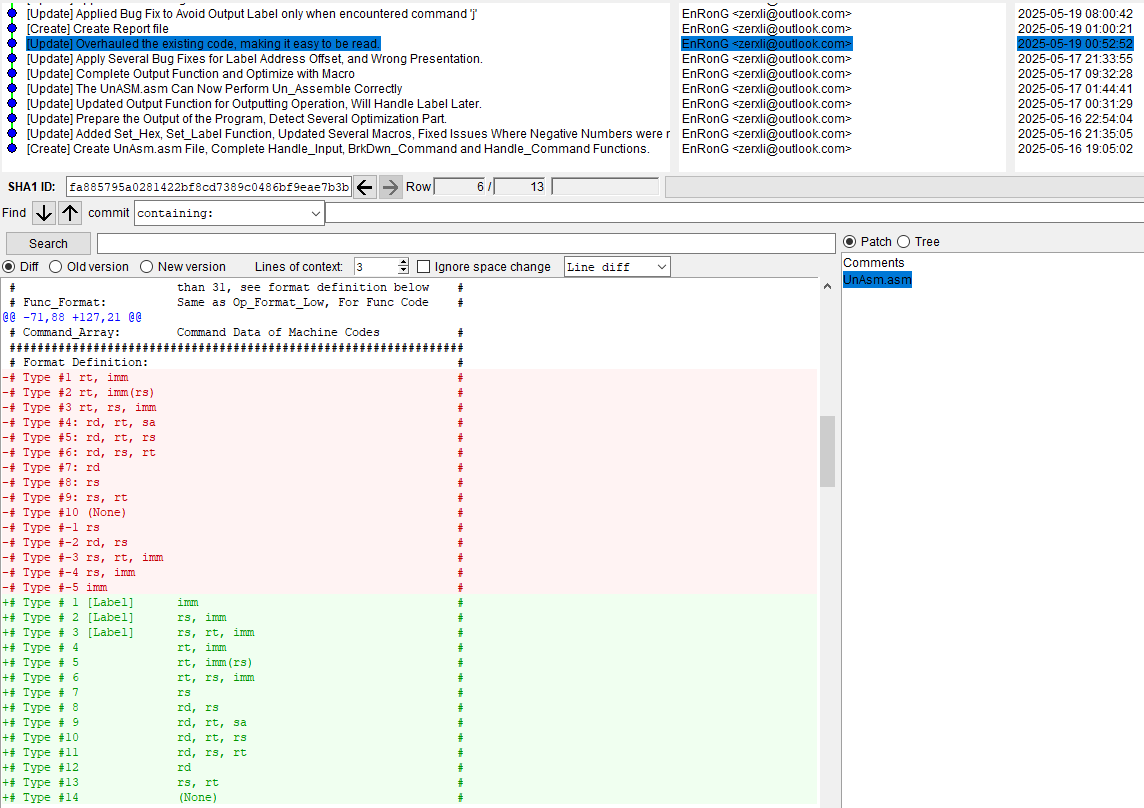
完成这一次重构之后,第一版代码中没有解决的陈旧问题也一个接一个地浮出了水面。
首先,在初版代码中我在分解指令时并没有对I指令的$16$位立即数进行符号判别,而对J指令而言,从机器码中拆分出的$26$位立即数并不会出现负数的情况,导致我在后期每次加载立即数时都要差别是否为J指令,这样繁杂的判定方式也导致了刚修好这里,其他地方又出现新的问题的现象。在多次进行修补还是没有办法解决问题时,我选择直接在分解指令时直接判定是否为负数,而解决了这一个问题。
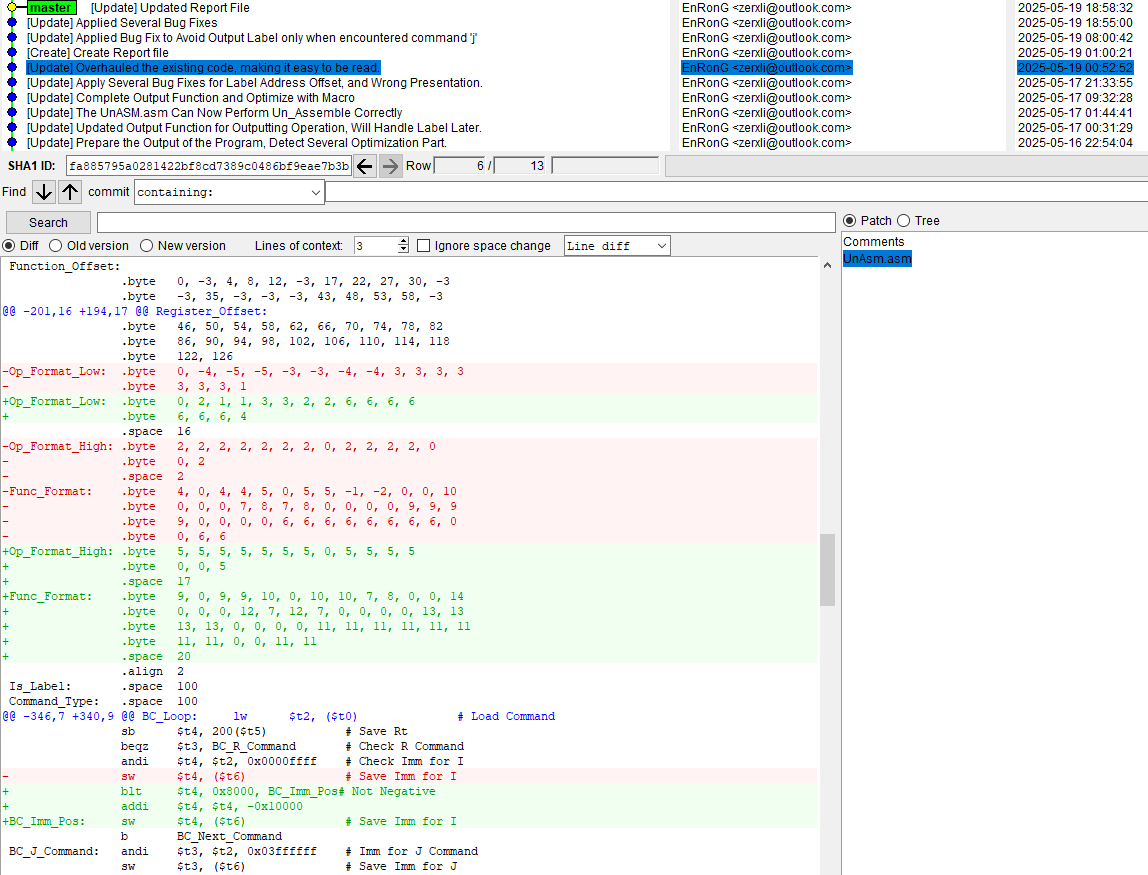
其次,初版对于非法指令的容错能力是不足的,由于我在初版代码中使用了比较省内存的操作去存储Op_Code、Function_Code等,我对每个指令编号对应的Op_Format和Func_Format同样也只预留了对应较少有效指令的空间,这导致的问题是,当存在Op码为$16\to31$或$47\to63$的或Func码大于$43$的情况时,其在计算格式编号偏移量时会出现异常,为了避免引入更加复杂的判断来解决这个问题,我最终选择将Op_Format和Func_Format均补全其大小到$64$,由于数据段中.space的内存默认赋值为$0$,这样做使得这些非法数据都能对应上没有符合条件的格式的结果。
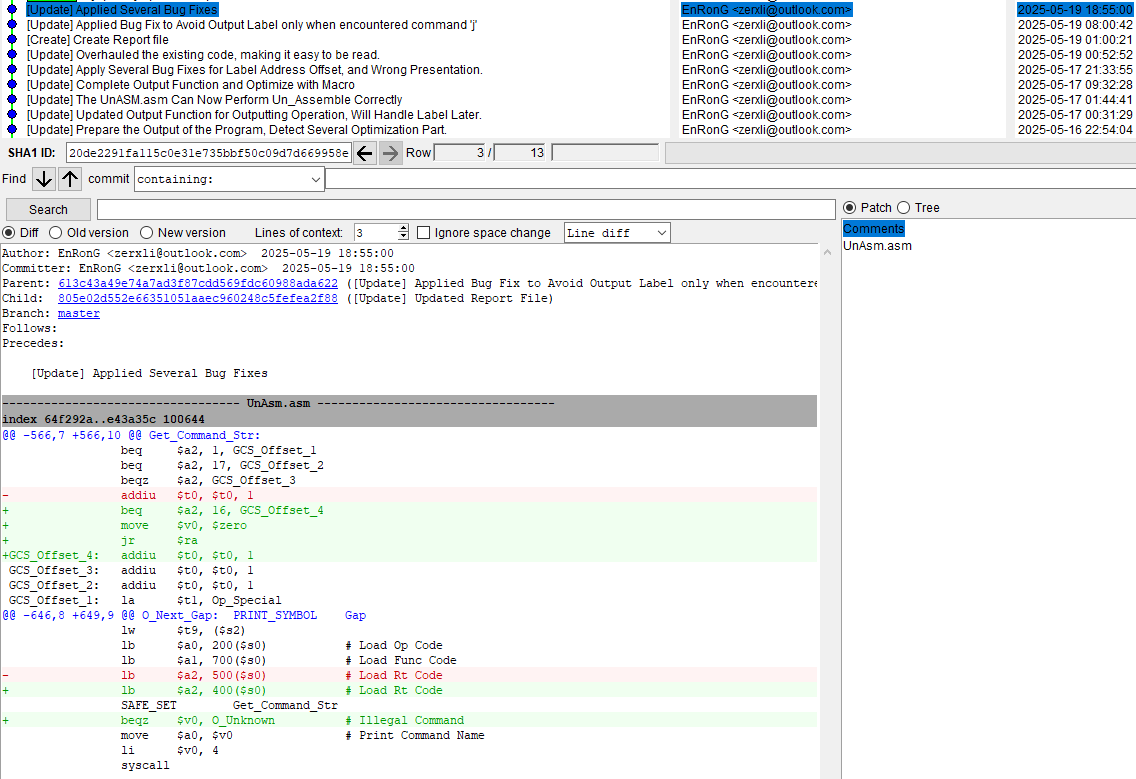
另一个一直埋着的雷就是在前文中Get_Command_Str函数中被专门进行特殊判定的Op_Code为$1$,而Rt寄存器的值不合法的情况,在进行格式检查时,因为Op_Code为$1$时,指令的输出格式本身就已固定,所以忽略掉了在这里作文章的情况。发现这个特殊情况后,我立即追加了这样的修复,并在Output中新增了特判,以防止在这样的非法数据下翻车。
编程就是这样,在不断的实践中积累经验,从以往的错误中汲取教训。其实一开始我在听到以反汇编作为大作业时想到的最麻烦的问题其实是将已展开的宏还原回去,如果问题是这样的话,那么代码中就需要有额外的检查,并且将宏还原后,PC的检查也将会是一大麻烦的问题,我想这应该是我后续学习中需要思考的内容,并尝试用简洁的方式去将其解决。
查阅资料得知,通过“跳表”代替繁杂的branch语句,应该也能对代码进行进一步的简化,这也是我后续代码的优化方向。